
Products are getting more complex. In a world where software is quickly becoming the most complex part of every car, a toaster has a wifi card and sends messages to a mobile phone and refrigerators are connected online to Amazon, the importance of software BOM cannot be overstated.
Historically, each of the BOMs naturally lived in its own silo. Mechanical engineers were responsible for creating the BOM by exporting it from the MCAD. The same was done by electronics engineers designing PCBA. Software components were managed separately. Such a status quo doesn’t provide a mechanism to control the entire product information, manage traceability and revision dependencies.
A few days ago, Martijn Dullaart published a very good article speaking about management of Software BOMs – Software in Configuration Management Baselines. I recommend you to check this out.
OpenBOM gives you a mechanism to control the entire produce structure in a robust yet simple way.

Digital BOM Foundation
The foundation of OpenBOM’s approach is the Digital Bill of Materials (Digital BOM), a data modeling concept that helps companies handle product data by leveraging modern graph-based data management technologies. You can read more about OpenBOM data modeling here.
An important core element of digital BOM is a flexible data model that allows you to build different item types for each element of the product structure and build a structure to define any product.
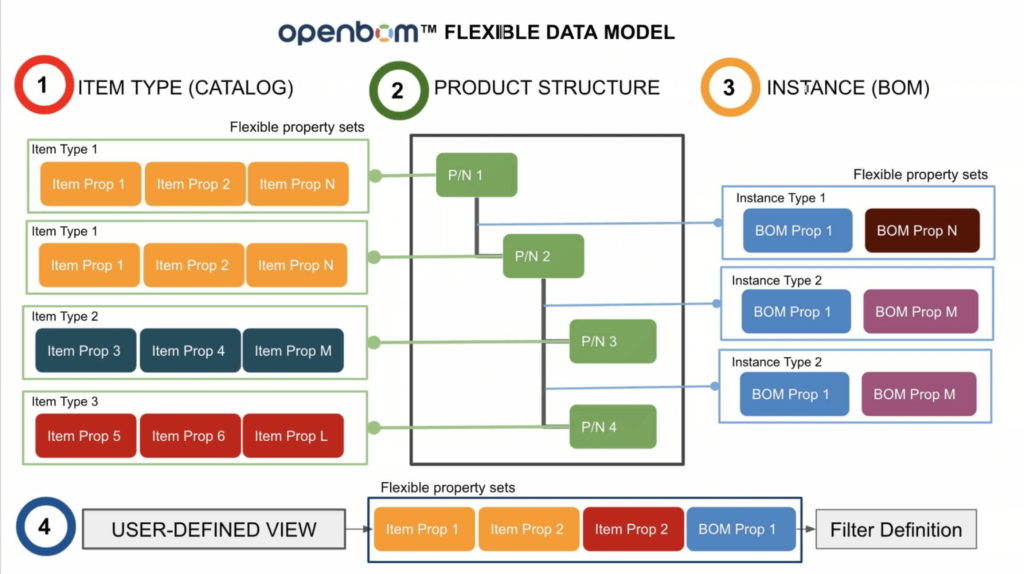
Multi-disciplinary BOM model
The ability of OpenBOM to manage multiple item types and create product structures seamlessly is the greatest way to create a complex structure capable of bringing mechanical, electronics, and software components together and managing the lifecycle of the entire model. In a simplified diagram, this is how it may look like:
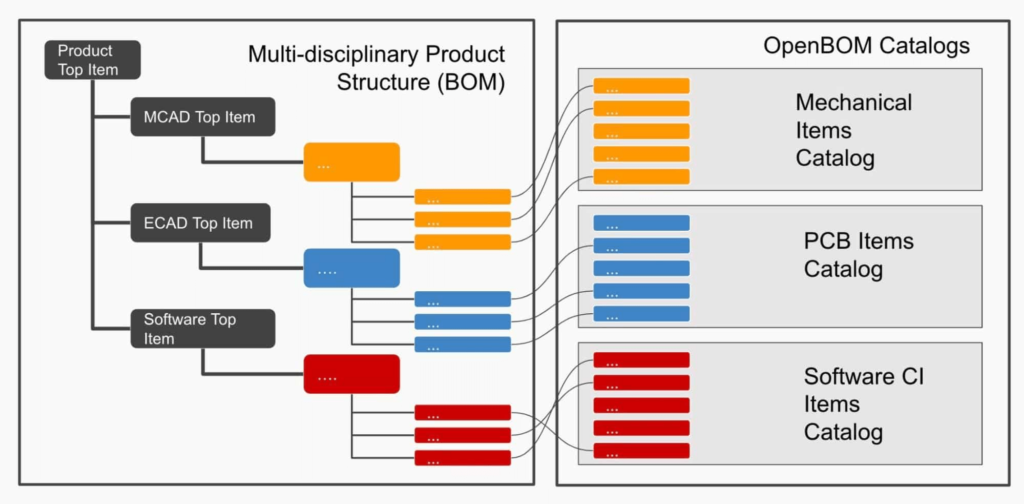
These data elements can be imported from each CAD system (MCAD, PCB, etc) as well as imported via Excel or via OpenBOM REST API. Once the data is imported, you can manage a product structure and recombine it in the way you need using OpenBOM’s intuitive and collaborative BOM editor.
OpenBOM Collaborative Digital BOM Editor
A super powerful capability of OpenBOM is an interactive collaborative editor of product structure. It allows multiple people to edit all BOMs simultaneously without overriding and blocking each other. OpenBOM gives you a seamless (a la Google Sheets) user interface that is tuned to specific catalog types and allows you to instantly manipulate BOM components.
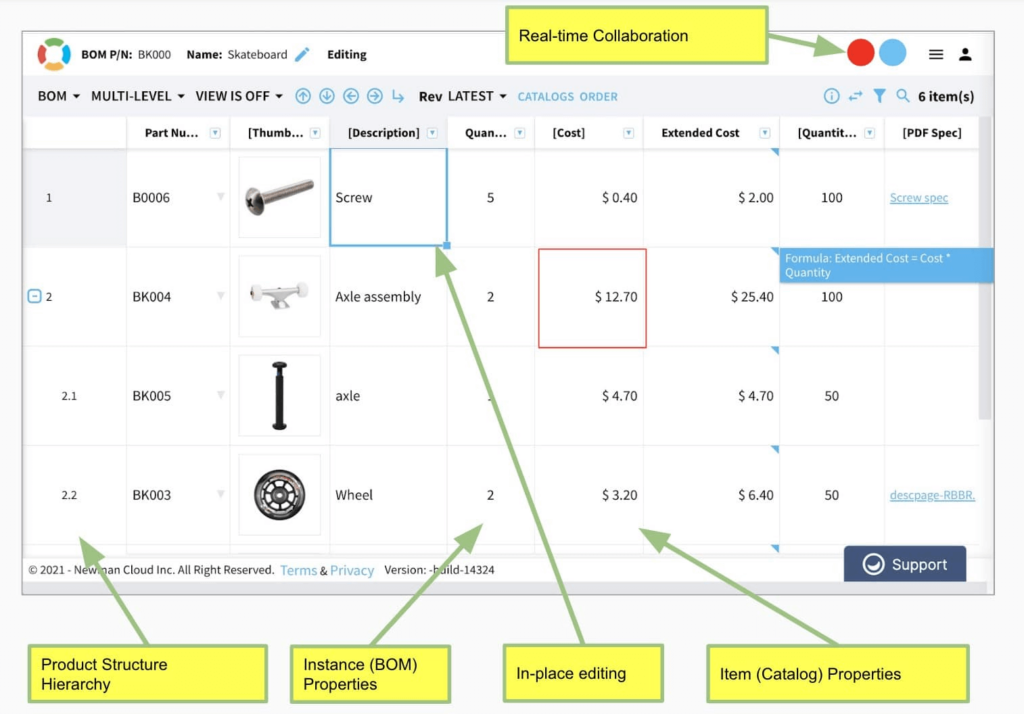
Video Demo
Please watch a quick video that demonstrates how you can easily create a multi-disciplinary BOM by combining different components and BOM modules.
Conclusion
The core element of OpenBOM is Digital BOM which provides a flexible and robust model to create and manage product information including different item types and structures. A flexible data model, which is part of OpenBOM, allows you to define a data model for any type of item- mechanical, electrical, electronic, or software. The beauty and simplicity of OpenBOM is that every item type (defined in catalogs) can have a different set of attributes including multiple file attachments, links to external systems and data sources combined allowing you to create the most comprehensive data structure for multi-disciplinary BOM.
REGISTER FOR FREE and check how OpenBOM can help you.
Best, Oleg
Join our newsletter to receive a weekly portion of news, articles, and tips about OpenBOM and our community.