
In the complex world of purchasing and supply chain management, navigating through the complexities of product records, Bills of Materials (BOMs), and cost information from various locations can be a daunting task. This complexity is further increased when costs are incurred in different currencies, making accurate financial planning and analysis a challenge.
OpenBOM offers a solution to these challenges with its flexible data model and robust formula capabilities, which streamline the flow of information and simplify the management of cost data across different currencies.

It All Starts with Accurate Product Records
The foundation of effective cost management in OpenBOM begins with the creation of accurate product records, encompassing items and BOMs. By importing data directly from Computer-Aided Design (CAD) systems, OpenBOM is able to establish a comprehensive BOM and item records, complete with all necessary information. This initial step ensures that the data foundation is reliable and accurate, setting the stage for effective cost analysis and management.
Adjusting the Data Model for Multicurrency Management
One of the key features of OpenBOM is its ability to adapt its data model to suit the needs of businesses operating in a global context. By adding properties that define costs for different locations (and accordingly, in different currencies), businesses can create a detailed and accurate repository of cost and supplier information. This adaptability allows for a granular level of control over cost data, enabling precise financial planning and analysis.
For multiple currencies, we recommend adding additional cost properties and adjusting their currency using the Edit property command.

Formulas for Currency Recalculation
A crucial aspect of managing costs in a multicurrency environment is the ability to recalculate costs into a unified currency. OpenBOM’s formula functionality allows users to define formulas that automatically convert costs from various currencies into a single, preferred currency. This capability is essential for preparing data for analysis and ensures that cost comparisons are accurate and meaningful, facilitating better decision-making.
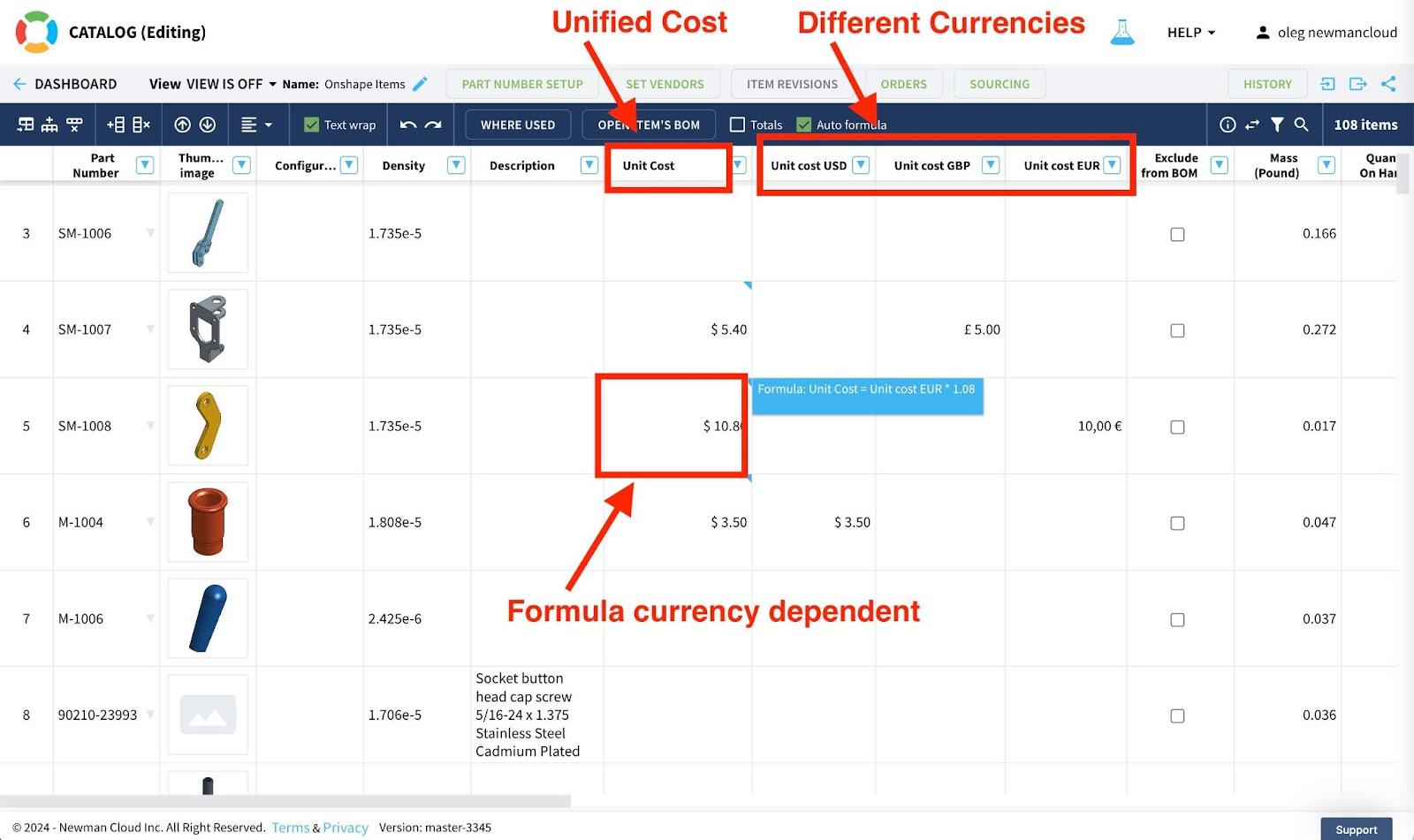
Keep in mind not using [x] apply formula to all rows.

Leveraging the Catalog for Unified Currency Analysis
The integration of formulas into OpenBOM’s catalog system is a game-changer for cost management. By aligning costs in different currencies with the unit cost in a unified currency, OpenBOM allows for these values to be seamlessly used in BOM cost rollups or any other calculations. This functionality not only simplifies the financial analysis process but also enhances the accuracy and reliability of cost data across the board.
Conclusion: The Power of Flexibility and Formulas
OpenBOM’s flexible data model and powerful formula capabilities provide a robust foundation for managing product information and costs, particularly in a multicurrency environment. By streamlining the flow of accurate data and simplifying complex financial calculations, OpenBOM enables businesses to make informed decisions based on reliable, comprehensive cost analyses. Whether it’s for BOM management, product development, or financial planning, OpenBOM’s tools are indispensable for businesses looking to navigate the complexities of the global market.
Embrace the power of OpenBOM to create a solid data foundation for various forecasts and cost calculations, which are absolutely crucial for BOM and product management.
Register with OpenBOM today and check how OpenBOM can help you today.
Best, Oleg
Join our newsletter to receive a weekly portion of news, articles, and tips about OpenBOM and our community.