Think of your production process like a complex symphony. You have skilled operators, capable machines, and quality materials, but without a conductor, you get noise instead of music. Each department plays its own tune, leading to missed cues and a messy final performance. Production planning and scheduling software is the conductor for your factory. It ensures every part of your operation, from procurement to the shop floor, works in harmony from a single sheet of music. This guide will show you how these tools create a smooth, efficient workflow, turning disconnected activities into a streamlined process that consistently delivers a perfect final product.
Key Takeaways
- Focus on fit, not features: The best software isn’t the one with the most features; it’s the one that fits your specific manufacturing style and company size. Prioritize finding a solution that solves your unique challenges.
- Prioritize integration and clean data: Your new software is only as good as the data you put into it. Ensure it integrates smoothly with your existing systems, like CAD and BOM tools, and commit to cleaning up your data before you start for a successful rollout.
- Calculate the total cost of ownership: Look beyond the sticker price by factoring in all associated costs, including implementation, data migration, and team training. This gives you a realistic budget and helps you avoid future financial surprises.
What Is Production Planning and Scheduling Software?
Production planning and scheduling software is your command center for manufacturing. Think of it as the tool that answers all the critical questions: what product to make, when to make it, which machine to use, and what materials you’ll need to get the job done. It takes the complex puzzle of customer orders, resource availability, and supply chain timelines and organizes it into a clear, actionable strategy. This isn’t just about creating a to-do list; it’s about building an intelligent roadmap that optimizes every step of your production process.
Without a solid plan, you’re left reacting to problems instead of preventing them. This software helps you move from reactive to proactive, giving you a bird’s-eye view of your entire operation. The goal is to create a smooth, efficient workflow from the moment an order comes in to the final product shipping out the door. You’ll often hear these tools called Advanced Planning and Scheduling (APS) systems or manufacturing planning software, but they all share the same core mission: to help you make the right things at the right time. By centralizing information and optimizing processes, this software enables better supply chain collaboration and ensures everyone, from the shop floor to the front office, is working from the same playbook. It’s about creating a single source of truth that keeps production on track, on time, and on budget.
Production Planning vs. Production Scheduling: What’s the Difference?
It’s easy to use “planning” and “scheduling” interchangeably, but they represent two distinct, equally important activities. Think of it this way: production planning is the “what” and “why,” while production scheduling is the “when” and “how.”
Production planning is your high-level strategy. It looks at the big picture, using demand forecasts and capacity analysis to decide what products to manufacture and in what quantities over a longer period, like a month or a quarter. It’s about setting the overall production goals.
Production scheduling, on the other hand, is the tactical execution of that plan. It takes the master plan and breaks it down into a detailed, day-to-day timetable. It assigns specific jobs to specific machines and operators, creating a sequence of operations to meet the deadlines established in the plan.
ERP vs. MRP vs. APS: Which One Do You Actually Need?
Navigating the alphabet soup of manufacturing software can be confusing, but it’s simpler than it seems. Each system serves a different primary function.
MRP (Material Requirements Planning) is the foundation. It focuses on one thing: materials. An MRP system calculates exactly what materials you need, how much you need, and when you need them, based on your production schedule and an accurate Bill of Materials. Effective BOM management is the heart of any good MRP system.
ERP (Enterprise Resource Planning) is the all-in-one business suite. It takes MRP and integrates it with every other part of your business, including finance, sales, and human resources. An ERP provides a single, unified system to manage the entire company, not just the factory floor.
APS (Advanced Planning and Scheduling) is the optimizer. It uses sophisticated algorithms to create the most efficient production schedule possible by considering real-world constraints like machine capacity, labor availability, and material delivery times. It answers the question: “What is the absolute best way to get this done?”
Key Features to Look For
When you start looking at production planning software, the sheer number of features can feel overwhelming. How do you separate the must-haves from the nice-to-haves? It helps to group features into three main categories: the core functions you can’t operate without, the advanced tools that give you a competitive edge, and the collaboration features that keep your entire team on the same page. Let’s break down what to look for in each category so you can find a solution that truly fits your needs.
Core Features You Can’t Live Without
These are the foundational tools that make production planning software work. Think of them as the non-negotiables. At its heart, the software should help you plan, schedule, and optimize your production processes. This includes features for managing resources, organizing workflows, and creating realistic production timelines to ensure everything runs smoothly with minimal delays. For most manufacturers, this also means having a robust system for BOM management that connects directly to your production plan. These core features provide the basic structure you need to get control over your operations and move away from messy spreadsheets.
Advanced Features That Are Worth the Investment
Once you have the basics covered, advanced features are what help you get ahead. This is where you’ll find tools that turn your production data into a strategic asset. Advanced Planning and Scheduling (APS) systems use your data to create realistic, executable schedules that can significantly improve throughput and on-time delivery. According to Siemens, using this type of software helps factories become more efficient, waste less, and increase profitability. Look for features like what-if scenario modeling, demand forecasting, and real-time analytics. These tools are part of a modern product lifecycle management strategy and are definitely worth the investment for growing businesses.
Collaboration Tools to Keep Your Team in Sync
Manufacturing isn’t a solo sport. Your software should act as a central hub that keeps everyone aligned and working toward a common goal. Collaboration tools provide real-time visibility across planning and execution teams, which is critical for adapting to unexpected challenges. When your material handler, production manager, and sales team are all looking at the same data, you can make faster, smarter decisions. Effective supply chain collaboration features ensure that everyone, from internal teams to external partners and suppliers, is on the same page. This streamlined communication is key to maintaining high service levels and keeping production on track.
The 10 Best Production Planning and Scheduling Tools
With a clear idea of the features you need, you’re ready to explore the software itself. The market is full of options, each with its own strengths. Some are built for massive global operations, while others are tailored for small, make-to-order shops. We’ve gathered ten of the best production planning and scheduling tools to help you compare and find the right solution for your team. This list covers a range of functionalities and price points, giving you a solid starting point for your research.
Remember, the “best” tool is the one that fits your specific manufacturing style, team size, and technical ecosystem. As you go through these options, think about your must-have features versus your nice-to-haves. Consider how each platform would integrate with the systems you already use, like your CAD and inventory management software. This isn’t just about buying software; it’s about finding a partner for your production process. A great tool will not only schedule jobs but also provide visibility across your supply chain, facilitate better team collaboration, and ultimately help you deliver products on time and on budget. Let’s look at some of the top contenders.
1. OpenBOM (Best for BOM-driven production planning)
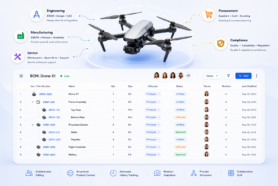
If your entire production process revolves around the Bill of Materials, OpenBOM is built for you. It’s a cloud-native platform that excels at connecting your BOM to everything else: inventory, vendors, and purchase orders. This integration is its superpower. Instead of managing data in separate silos, you get a single source of truth that updates in real time. It’s designed for collaboration, allowing engineering, procurement, and production teams to work together seamlessly. Because it’s so focused on BOM management, it ensures that your production plans are always based on accurate, up-to-date product data, which helps prevent costly errors and delays down the line.
2. SAP ERP (Best for large enterprises)
SAP is a giant in the enterprise software world for a reason. Its S/4HANA Manufacturing suite is a powerhouse designed for large, complex organizations that need a comprehensive, all-in-one solution. It offers advanced Material Requirements Planning (MRP) with real-time data processing, which allows for incredibly responsive planning. This system is ideal for global companies that manage vast supply chains and high-volume production. While the implementation can be a significant undertaking, the depth of its capabilities is unmatched for enterprises looking to standardize operations and gain deep analytical insights across their entire business.
3. Oracle Manufacturing Cloud (Best for complex, multi-site operations)
For businesses juggling production across multiple factories or even multiple countries, Oracle Manufacturing Cloud is a top contender. It’s specifically designed to handle the complexities of distributed manufacturing environments. The platform provides a unified view of all your production sites, making it easier to balance workloads, manage resources, and maintain quality standards everywhere. Its robust toolset supports various manufacturing methods, from discrete to process manufacturing. This makes it a flexible choice for large companies with diverse product lines and a need for centralized control over their global production footprint.
4. Siemens Opcenter (Best for advanced scheduling)
When your biggest challenge is optimizing the factory floor schedule down to the minute, Siemens Opcenter is the tool to look at. It specializes in Advanced Planning and Scheduling (APS), using sophisticated algorithms to create highly efficient production sequences. The goal is to maximize throughput, minimize downtime, and reduce waste. Opcenter helps you answer tough questions like which job to run next on which machine for the best outcome. This level of detailed production scheduling is perfect for manufacturers in competitive industries where operational efficiency directly impacts the bottom line.
5. Fishbowl Manufacturing (Best for small manufacturers)
Fishbowl is a popular choice for small businesses that need serious manufacturing and inventory tools without the enterprise-level price tag. It integrates directly with QuickBooks, which is a huge plus for many small companies. Fishbowl provides core MRP functionality, including work orders, bills of materials, and production scheduling, all in a package that’s more accessible than a full-blown ERP. It’s a great first step for manufacturers who have outgrown spreadsheets but aren’t ready to commit to a massive, complex system. Its focus on inventory control makes it particularly strong for businesses that hold and manage their own stock.
6. Katana MRP (Best for make-to-order manufacturers)
Katana was built from the ground up for modern makers and make-to-order businesses. If you build products as orders come in, this tool understands your workflow. It provides a simple, visual interface that gives you a real-time view of your inventory, production schedule, and sales orders all in one place. This clarity helps you give customers accurate lead times and prioritize jobs effectively. Katana integrates smoothly with ecommerce platforms like Shopify, making it a fantastic choice for direct-to-consumer brands that manufacture their own goods and need a system that connects their sales and production operations.
7. MRPeasy (Best for small-to-mid-size manufacturers)
As the name suggests, MRPeasy aims to make production planning straightforward for small and medium-sized manufacturers. It’s a cloud-based MRP software that packs a lot of functionality into an affordable and user-friendly package. You get tools for production, inventory, procurement, and sales without the overwhelming complexity of larger systems. It’s a great middle-ground solution for growing companies that need more power than a simple inventory app but want to avoid a lengthy and expensive ERP implementation. Many users praise it for being a powerful, no-nonsense tool that just works.
8. Visual Planning (Best for visual production scheduling)
If your team thinks in timelines and Gantt charts, Visual Planning will feel like a natural fit. This software puts visual scheduling at the forefront, allowing you to manage resources, projects, and tasks with an intuitive drag-and-drop interface. You can see at a glance who is working on what, which machines are in use, and where potential bottlenecks might occur. This visual approach makes it incredibly easy to adjust schedules on the fly and communicate changes to the entire team. It’s an excellent choice for job shops and other manufacturers where schedules are dynamic and require constant adjustment.
9. Infor CloudSuite Industrial (Best for mid-market manufacturers)
Infor offers a comprehensive manufacturing solution that’s tailored for the needs of mid-market companies. It provides more depth than small business tools but is often more flexible and quicker to implement than the massive ERPs from SAP or Oracle. CloudSuite Industrial (CSI) covers everything from financials and order entry to production planning and quality control. It’s a well-rounded system designed to help mid-sized manufacturers streamline their entire operation. Infor also offers industry-specific functionality, which can be a major advantage for companies in specialized sectors looking for a solution that understands their unique challenges.
10. Jobscope (Best for engineer-to-order manufacturers)
For companies that operate on a project basis, like engineer-to-order (ETO) or make-to-order (MTO) shops, Jobscope is a purpose-built solution. Unlike traditional MRP software that focuses on repetitive production, Jobscope is designed around the job or project. It excels at managing job costing, material tracking, and scheduling for unique, complex projects. This ensures that you can maintain profitability and control on every single order, from initial engineering to final shipment. If your business treats every order as a distinct project, Jobscope’s project-centric approach can provide the control and visibility you need.
Weighing the Pros and Cons of the Top Tools
Choosing the right software isn’t just about picking features off a list; it’s about understanding the fundamental trade-offs. Every tool, from a simple MRP to a full-blown ERP, comes with its own set of benefits and potential headaches. The main goal is always the same: to minimize costs and production time while keeping your customers happy. Effective planning is what keeps you competitive, and the right software is a huge piece of that puzzle. Let’s break down what you can realistically expect to gain and what challenges you might face along the way so you can make a choice that truly fits your business.
The Upside: What You Gain with the Right Software
Let’s be honest, manual scheduling with spreadsheets is a recipe for bottlenecks and missed deadlines. The biggest win with dedicated software is moving past those inefficiencies. These tools help you streamline operations by automating schedules, giving you a clear view of your resources, and making it easier to adapt when things change, like a sudden rush order or a supplier delay. This optimization directly impacts your bottom line by reducing waste and improving throughput. Ultimately, it helps you solve the frustrating problems that lead to unhappy customers, like late shipments and stockouts. You get a system that works for you, not against you.
The Downside: Potential Hurdles and Trade-offs
On the flip side, implementing new software isn’t always a walk in the park. Some of the more powerful systems, especially large-scale ERPs, can be complex and come with a steep learning curve for your team. There’s also the cost to consider, which includes not just the subscription but also implementation and training. One of the most common frustrations is a lack of integration. If your new scheduling tool can’t talk to your other critical systems, you’re just creating new data silos. A tool that doesn’t connect smoothly with your existing CAD integrations or BOM management system can create more manual work, defeating the whole purpose.
Let’s Talk Pricing: How the Top Tools Compare
Figuring out the cost of production planning software can feel like trying to hit a moving target. Many providers don’t list prices on their websites, and the final number often depends on a mix of factors unique to your business. The price tag is typically determined by the type of system you choose (MRP, ERP, or APS), the size of your team, the specific features you need, and the level of support and implementation required. This variability makes direct, apples-to-apples comparisons tricky.
While some modern, cloud-based platforms offer transparent, tiered subscription plans, many traditional systems still rely on custom quotes. This means you’ll likely need to connect with a sales team to get a precise figure. Think of this as a good thing; it’s an opportunity to discuss your specific challenges and ensure the tool is the right fit before you commit. A good vendor will work with you to understand your production style, existing tech stack, and future goals. Understanding the general pricing models for each software category will help you go into those conversations prepared and with realistic expectations for your budget. It also helps you look beyond the sticker price and consider the total cost of ownership, which includes training, maintenance, and potential customization fees down the line.
What to Expect from MRP Pricing
Material Requirements Planning (MRP) software is designed to answer three simple questions: what do you need, how much do you need, and when do you need it? While MRP started as a standalone tool, it’s now often a core module within a larger ERP system. Pricing can vary quite a bit, with some enterprise-level solutions costing several hundred dollars per user per month, especially for on-premise or hybrid deployments.
However, many modern cloud-based MRP tools offer more accessible pricing, often structured in tiers based on the number of users and feature sets. These subscriptions make it easier for small to mid-sized manufacturers to adopt powerful planning tools without a massive upfront investment. The key is to find a system that aligns with your BOM management needs and can scale with you as you grow.
What to Expect from ERP Pricing
Enterprise Resource Planning (ERP) systems are the all-in-one platforms that connect data from across your entire organization, from the shop floor to the finance department. Because of their comprehensive nature, ERP pricing is the most variable. The cost is heavily influenced by which modules you choose to implement, such as production planning, inventory, accounting, and customer relationship management.
You can expect the final price to be calculated based on the number of user licenses, the specific modules you activate, and any necessary customizations. Don’t forget to factor in one-time implementation and data migration fees, which can be significant. While the investment is larger, a fully integrated ERP provides a single source of truth that can streamline operations company-wide.
What to Expect from APS Pricing
Advanced Planning and Scheduling (APS) software is a specialized tool that creates highly realistic and optimized production schedules. It considers machine capacity, labor constraints, and material availability to improve throughput and on-time delivery. The pricing for APS tools reflects this specialization and can range widely.
For smaller shops, lightweight cloud solutions offer powerful scheduling capabilities for a predictable monthly fee. On the other end of the spectrum, large enterprises with multiple plants might invest in complex, custom-quoted systems that can handle intricate scheduling puzzles. The cost of an APS system is often justified by the direct impact it has on efficiency and your ability to meet customer deadlines.
Finding the Right Fit for Your Business Size
Finding the right production planning software isn’t a one-size-fits-all deal. The tool that works wonders for a five-person machine shop will likely be a poor fit for a multinational corporation, and vice versa. As your business grows, your needs change. You might start out just needing to track parts and orders, but soon you’ll require real-time inventory data, better collaboration with suppliers, and sophisticated planning across multiple production lines. The key is to choose a system that solves your problems today while giving you room to grow tomorrow.
Some platforms are built to scale with you, offering a flexible foundation that adapts as your operations become more complex. For example, starting with a robust system for BOM management can create a single source of truth that makes it easier to adopt more advanced planning and inventory tools later on. This foundational data structure is critical. When your bill of materials is accurate and centralized, everything from purchasing to production scheduling becomes more reliable. Instead of searching for the “best” software in a vacuum, think about the best fit for your current team size, production complexity, and future ambitions. Let’s break down what that looks like for different stages of business growth.
Best for Small Shops (1–50 Employees)
If you’re running a small shop, your focus is likely on getting products out the door without getting bogged down by complicated software. You need tools that are affordable, easy to set up, and straightforward to use. Lightweight, cloud-based solutions like Katana or MRPeasy are often a great starting point because they cover the essentials of inventory, order tracking, and basic production planning without a steep learning curve. The goal here is to establish good habits and create a central hub for your data. This ensures that as you grow, you’re building on an organized foundation instead of a tangled mess of spreadsheets.
Solutions for Mid-Sized Manufacturers (50–500 Employees)
As your company scales, the cracks in simpler systems start to show. Managing multiple product lines, coordinating with a growing list of suppliers, and keeping different departments on the same page becomes a major challenge. This is where more versatile MRP systems come into play. Tools like SAP S/4HANA Manufacturing offer real-time planning capabilities that help you respond quickly to changes. At this stage, your focus shifts to creating a single source of truth across the organization. You need a platform that supports seamless supply chain collaboration and gives everyone from engineering to purchasing access to the same live data.
Enterprise-Grade Tools (500+ Employees)
For large-scale manufacturers, especially those with complex products or multiple production facilities, efficiency is everything. Small optimizations can lead to massive cost savings, but they require incredibly powerful software to identify and implement. Advanced planning and scheduling (APS) solutions like Siemens Opcenter are designed for this level of complexity. These enterprise-grade tools help you manage intricate production schedules, reduce waste, and maximize output across your entire operation. They are often part of a broader Product Lifecycle Management strategy, providing the data-driven insights needed to stay competitive at a global scale.
Integrating New Software with Your Existing Tech Stack
Choosing a new production planning tool is a big step, but the work doesn’t stop once you’ve made your selection. A new piece of software is only as good as its ability to work with your current setup. If it creates more silos or manual work, it defeats the purpose. The goal is to create a single source of truth where data flows smoothly between the systems you rely on every day.
A successful rollout depends on how well the new software connects with your existing tools and the quality of the data you feed it. Let’s break down what that means for your team.
Connecting to Your CAD, BOM, and Inventory Systems
Your production planning software needs to communicate seamlessly with your other core systems. When your tools don’t talk to each other, you end up with disconnected, manual processes that lead to mistakes and delays. To get the most out of your new software, ensure it can connect directly with your existing CAD, BOM, and inventory management tools. This integration is essential for creating a smooth and efficient production workflow. For example, having your planning tool pull data directly from your CAD integrations and BOMs ensures that everyone is working from the most current designs and part lists, which helps reduce errors from the start.
Why Clean Data Is Non-Negotiable for a Smooth Rollout
Think of it this way: the quality of your production plan is determined almost entirely by the quality of the data you put into it. If your data is messy, incomplete, or inaccurate, your production plans will be too. Clean data is the foundation for effective decision-making and operational efficiency. Before you roll out any new software, you have to commit to organizing your data. This means establishing disciplined processes for how information is entered and maintained. A well-managed Bill of Materials is a great starting point, as it serves as the central recipe for your product and impacts everything from purchasing to production. Taking the time to clean up your data first is a non-negotiable step for a smooth implementation.
Common Implementation Hurdles (and How to Clear Them)
Switching to a new production planning system is a big move, and let’s be honest, big moves can come with a few bumps in the road. It’s tempting to focus only on the finish line, where everything runs smoothly, but a successful rollout depends on how you handle the journey itself. The good news is that the most common challenges are entirely predictable and manageable with a bit of foresight.
Thinking through these potential hurdles ahead of time is the best way to ensure a smooth transition for your team and your operations. From moving your existing data and getting your team excited about the new tools, to planning for future growth and keeping all your stakeholders in the loop, a clear strategy makes all the difference. Let’s walk through the four biggest implementation challenges and talk about practical ways to clear them.
Handling Data Migration and Integration
Your new software is only as good as the data you put into it. Many production planning issues come from siloed information and manual processes, so the goal is to create a single source of truth. Before you flip the switch, you need a solid plan for migrating your data. This starts with cleaning up your existing information, because you don’t want to carry old errors into a new system. Then, map out how the new software will connect with your existing tools. A platform with strong CAD integrations is essential for pulling design data directly into your production plans, ensuring everyone is working from the most current files and reducing manual entry mistakes.
Getting Your Team Onboard with Great Training
A new software platform can feel like a huge change for your team. To get everyone on board, you need more than a single lunch-and-learn session. Great training is key to making sure your team feels confident and capable with the new tools. When everyone is aligned and understands how the software helps them do their job better, you’ll see a much faster return on your investment. Plan for role-specific training that shows each person exactly how the system impacts their daily tasks. It’s also helpful to identify a few internal champions who can provide peer support and encourage adoption long after the initial training is over.
Planning for Customization and Future Growth
The software you choose today needs to work for the company you’ll be tomorrow. It’s easy to get caught up in solving your immediate production headaches, but the most effective solutions are both scalable and customizable. As your business grows, your processes will evolve, you’ll add new product lines, and your team will expand. Your software needs to be able to grow with you. Look for a platform that allows you to tailor workflows to your specific needs without requiring a team of developers. A comprehensive product lifecycle management (PLM) approach ensures your system can adapt to changing market demands and support your long-term vision.
Managing Change and Keeping Stakeholders Happy
Implementing new software affects everyone, from your engineers and shop floor managers to your suppliers and customers. Effectively managing this change requires clear and consistent communication. Make sure everyone understands why the change is happening, what to expect, and how it will ultimately benefit them. Keeping stakeholders informed and engaged is critical for a smooth transition and helps prevent the kind of disruptions that can lead to missed orders or unhappy customers. A platform that facilitates supply chain collaboration can be a huge asset here, as it keeps your external partners in the loop and makes them feel like part of the team from day one.
How to Choose the Right Production Planning Software
Picking the right production planning software can feel like a huge task, especially with a sea of acronyms like MRP, ERP, and APS to sort through. But making the right choice is one of the most important strategic decisions you can make for your manufacturing business. The right tool doesn’t just create a schedule; it streamlines your entire operation, from initial design to final delivery. It connects your team, clarifies your inventory needs, and gives you the data to make smarter, faster decisions.
A great system brings all your product information together in one place, creating a single source of truth that prevents costly errors and production delays. Instead of getting bogged down by features, a better approach is to focus on your specific business needs. Think about your unique manufacturing style, the true total cost of the software, and the critical questions you need to ask before signing any contracts. By focusing on these key areas, you can confidently select a platform that not only solves today’s problems but also grows with you tomorrow. This process ensures you invest in a solution that truly supports your supply chain collaboration and production goals.
Match the Software to Your Manufacturing Style
The first rule of software selection is that there is no one-size-fits-all solution. The best tool for a custom, engineer-to-order job shop will be completely different from what a high-volume, make-to-stock company needs. Before you even look at a demo, take the time to map out your current production workflow. Where are the bottlenecks? What manual tasks are eating up your team’s time? Understanding your process is key.
For example, advanced planning and scheduling (APS) software is designed to turn complex orders and machine constraints into realistic, executable schedules. This is perfect for dynamic environments. If your process is more straightforward, a simpler MRP system might be all you need. The goal is to find software that molds to your business, not the other way around. A system with flexible BOM management can adapt to various manufacturing styles, from simple assemblies to complex, multi-level products.
Look Beyond the Sticker Price: Calculate the Total Cost of Ownership
The price tag on a software license is just the beginning of the story. To get a true sense of the investment, you need to calculate the total cost of ownership (TCO). This includes all the associated expenses over the software’s entire lifecycle. Think about one-time implementation fees, the cost of migrating your existing data, and the hours your team will spend in training.
Also, consider ongoing costs like annual subscription fees, customer support packages, and maintenance. Some systems, particularly traditional MRP software, are sold in modules, so you may need to pay extra for features that are essential to your operations. By adding up all these potential expenses, you can create a realistic budget and avoid any unpleasant financial surprises down the road. This helps you accurately compare options and understand the long-term value of a comprehensive product lifecycle management platform.
Key Questions to Ask Before You Commit
Once you’ve narrowed down your options, it’s time to dig into the details with some pointed questions. Your goal is to understand exactly how the software will perform in your real-world environment. In manufacturing, things rarely go exactly as planned, so you need a tool that can adapt to fluctuating demand and unexpected disruptions.
Come to your vendor demos prepared with a list of questions, such as:
- How does the software handle last-minute changes to orders or material shortages?
- Can it easily connect with our existing CAD tools and accounting systems?
- What does the implementation and training process look like, and what level of support is included?
- Is the platform scalable enough to support our company’s growth over the next five years?
Getting clear, direct answers to these questions will help you choose a partner, not just a product.
Frequently Asked Questions
I’m a small manufacturer. Are these powerful tools out of my reach? Not at all. In fact, many of the best modern tools are built specifically for small to mid-sized businesses. While the idea of an “enterprise” system can sound intimidating and expensive, many cloud-based platforms offer affordable, subscription-based pricing. These tools give you the core power of production planning, inventory control, and BOM management without the massive upfront cost or complexity of a traditional ERP. The key is to find a solution that solves your immediate problems, like getting off spreadsheets, and can grow with you as your business expands.
Do I really need a full ERP system, or is something else enough? That’s the million-dollar question, and the answer depends entirely on your goals. If your main challenge is managing materials, inventory, and the production schedule, a focused MRP system is often the perfect fit. It gives you control over your manufacturing operations without the extra complexity. An ERP, or Enterprise Resource Planning system, is a much bigger step. It aims to be the single software for your entire company, connecting manufacturing with finance, sales, and HR. You only need an ERP if your goal is to unify every single department under one digital roof.
My biggest problem is keeping production plans and engineering designs in sync. What should I look for? This is a huge and very common challenge. The solution lies in one word: integration. You need to look for a production planning platform that connects directly to your other critical systems, especially your CAD software. When your planning tool can automatically pull data from your engineering designs and your Bill of Materials, you eliminate the risk of building from an outdated plan. This creates a single source of truth, ensuring that what engineering designs is exactly what production builds, saving you from costly mistakes and rework.
We use spreadsheets now. Why is switching to dedicated software really worth the effort? Spreadsheets feel familiar, but they are often the hidden source of major production headaches. They can’t provide a real-time view of your operations, they are notoriously prone to human error, and they make collaboration nearly impossible. Switching to dedicated software is worth it because it gives you a central, reliable command center for your entire production process. It automates scheduling, provides instant visibility into inventory levels, and ensures everyone from purchasing to the shop floor is working with the same accurate information. It’s about trading constant manual updates for a system that works for you.
What’s the single biggest mistake companies make when adopting new production software? The biggest mistake is rushing the implementation without cleaning up their data first. It’s tempting to just plug in the new software and expect it to magically fix everything, but the software is only as smart as the information you give it. If you import messy, inaccurate, or incomplete data from old spreadsheets, you will only get messy, inaccurate results from your new system. Taking the time to organize your information, especially your Bills of Materials, is the most critical step you can take to ensure a smooth and successful rollout.
Join our newsletter to receive a weekly portion of news, articles, and tips about OpenBOM and our community.