Are your part numbers getting in the way of efficient data management and streamlined operations? In a rapidly evolving industry like manufacturing, how you structure your part numbers can make or break your success. Intelligent naming conventions hold advantages over simpler systems, but with many product variations, it can be difficult to keep track of which features and options are represented as part of each number.
A Part Numbering system is one of the most debated topics in product lifecycle management and engineering and manufacturing software in general. The debates about the usage of “smart” or the so-called “intelligent part numbering system” are ongoing for ages. I shared my recent insight about part number discussion in my Beyond PLM article – Why Part Numbers are hard? The article also includes the results of my LinkedIn polls. Check this out.

OpenBOM Part Numbers – Best of Both Worlds
Why Part Numbers Are Important? The ugly truth is that the Part Numbering system decision is extremely important for the successful implementation of your product management strategies. Make a mistake and the company will be stuck for a very long time with the inefficient part numbering system.
In the modern environment, Part Number provides a unique reference to data about the product and, at the same time, should not be preventing companies from cluttering their processes and data exchange. The key purpose of Part Numbers is to support the uniqueness and to support traceability of the data. Traceability is important because it is a foundation of digital thread in every manufacturing company and across their suppliers and contractors.
OpenBOM offers comprehensive technology that makes your decision about part numbers easy. Simply put OpenBOM gives you a flexible Part Number mechanism, the ability to support any existing Part Number, and also to support automatic part number generation.
This is how OpenBOM is able to manage Part Numbers:
- Use any external Part number (simple and efficient if you have a system to manage it)
- Free typing (easy, but probably time-consuming)
- Automatic generation (using catalog part number setup – the best option)
OpenBOM allows you to create a very simple Part Number (just a number) and also to bring prefixes, suffixes, and separators to the Part Number schema. In the recent OpenBOM update (December 2022), we enhanced the mechanism of the Part Numbering system to make it even more flexible.
Part Number Schema Enhancements (December 2022)
Based on multiple feedback and requests, we decided to extend the flexibility of the Part Number definition. We added a nice feature that allows you to specify more separators in the part number sequence. The Yellow portion below is static but may contain additional special characters like dash, dollar, slash, etc, while the red portion is still the automatic sequence that will increment guaranteeing a unique part number value.
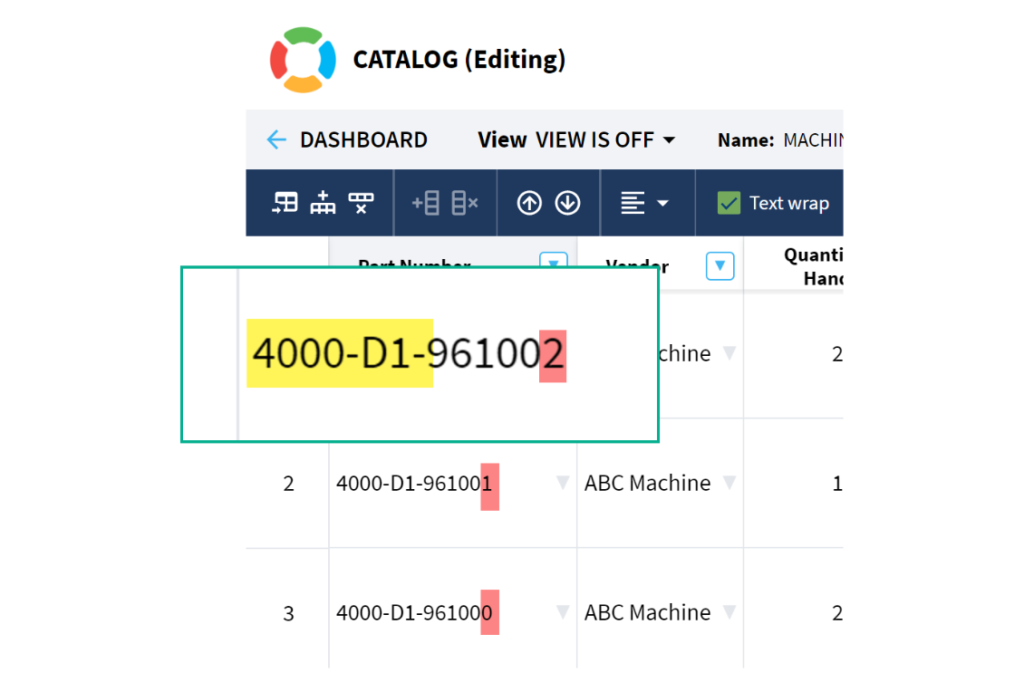
This is a simple update that unlocks the power in your part numbering schema. Example: 4000-D1-960001 can now be entered for any catalog part numbering setup. And the”01” at the end will automatically increment.
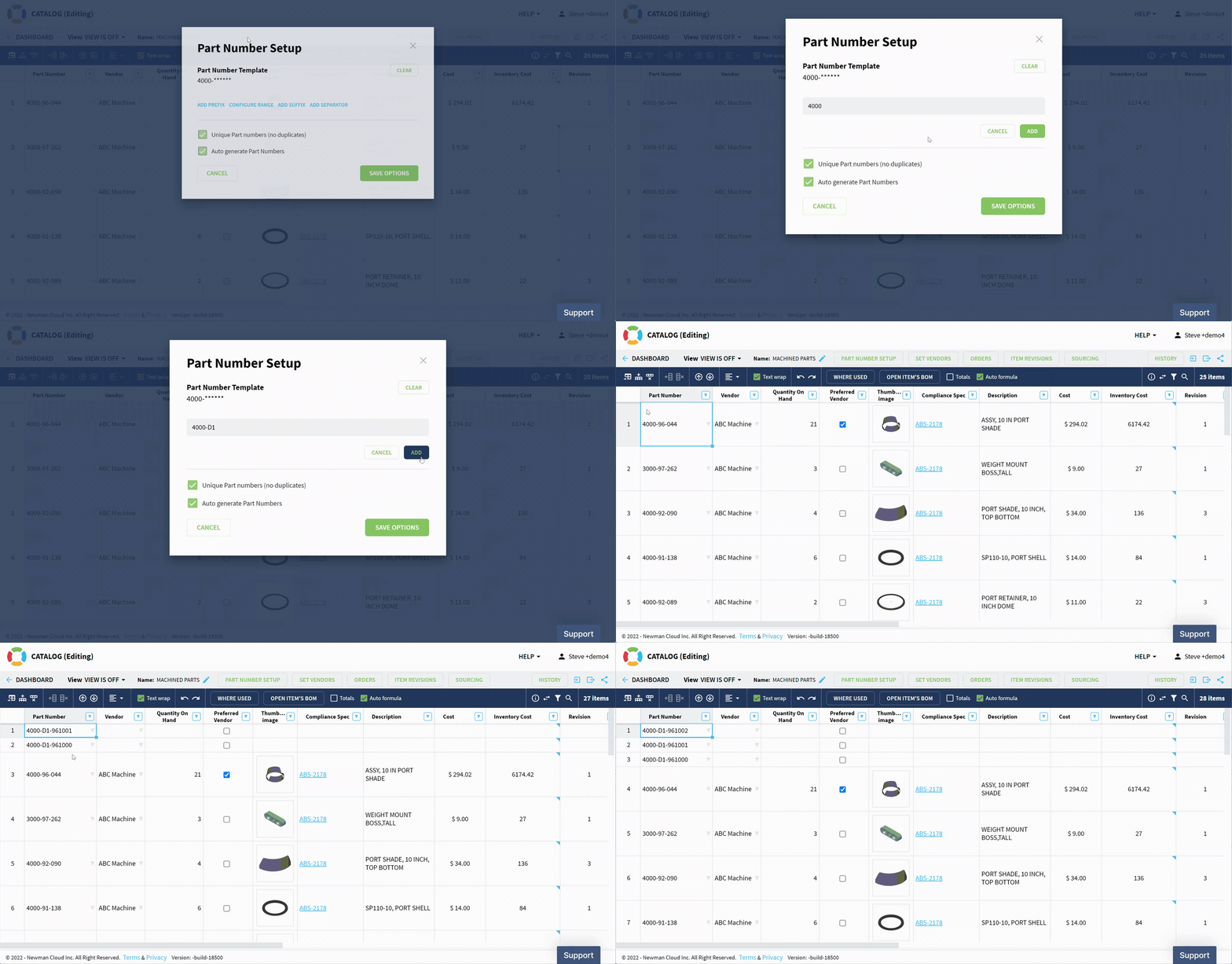
Check the following video demonstrating the capabilities of extended Part Number formatting.
Conclusion
OpenBOM provides a powerful and comprehensive mechanism to manage part numbers, support new part number generation, and use a Part Numbering system for traceability. In many ways, OpenBOM is the end of the debates about what Part numbering system you would like to implement. Always starting simple by planning a simple combination of prefixes and numbers can go a long way. However, if for some reason, you need a more complex schema, you can do it as well. The important thing – Part Numbering System should support your company’s requirements for data identification and traceability.
What to check how OpenBOM is managing Part Numbers?
REGISTER FOR FREE and get a 14-day free trial.
Best, Oleg
Join our newsletter to receive a weekly portion of news, articles, and tips about OpenBOM and our community.