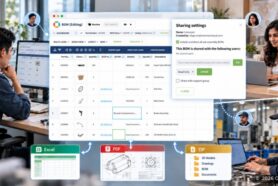
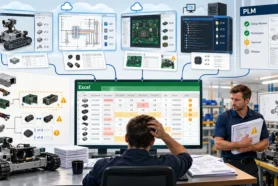
Most product teams collaborate all the time. Engineers work in CAD systems and exchange files. BOMs are exported to Excel and shared by email. Procurement teams live in financial systems like QuickBooks or similar tools and often maintain their own spreadsheets for orders and supplier communication. Contractors and suppliers sit even further away, usually seeing only fragments of information sent to them at the last minute.
Collaboration Breaks When Data Is Disconnected
Everyone is communicating, but the collaboration is not organized around product data. The BOM changes, but not everyone sees it. Orders are created, but engineering is not always aware of the implications. Managers try to understand the status, but the “latest” version of the BOM lives in several places at once. The problem is not a lack of tools or effort. The problem is that collaboration happens outside the system that actually holds product truth.
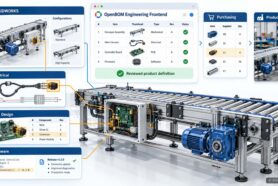
OpenBOM approaches this differently. Instead of treating collaboration as comments on documents or messages in chat tools, OpenBOM treats collaboration as part of the product data model itself. Engineers, procurement, managers, contractors, and suppliers work on the same connected data, from early design through manufacturing and purchasing. Communication is not separated from work — it is anchored directly to BOMs, items, orders, and purchase orders.
In this article, we walk through a single, realistic scenario that shows how this works in practice.
One Scenario, Many Roles
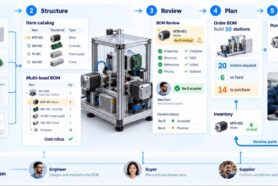
Let’s start with a situation that is very familiar. A product is getting close to production, and the team is reviewing the Bill of Materials before ordering components. Several roles are involved.
An engineer owns the design and the engineering BOM. A procurement user is responsible for ordering parts and managing suppliers. A manager wants visibility into readiness and risks. There may also be contractors or suppliers who need clarity on what is required and when.
Everyone is working in OpenBOM, but not everyone is doing the same thing. Each role interacts with the data differently, yet all of them are connected to the same product structure. This is not a theoretical workflow or a predefined “happy path.” It reflects how real work happens as products evolve and details are discovered late in the process.
Step 1: A Missing Component Is Discovered During BOM Review
During the BOM review, one of the users notices something important. A camera module that should be part of the product is missing from the BOM. This could happen for many reasons. The component might have been discussed verbally but never added. It might exist in a CAD assembly but was excluded from the BOM view being reviewed. Or it might simply be an oversight discovered at the worst possible moment — right before ordering.
What matters here is where this issue is found. It is discovered directly in the BOM, inside OpenBOM, not in a spreadsheet exported two weeks ago or in a PDF attached to an email. The reviewer is looking at live product data, in context, with full visibility into structure, quantities, and related information.
OpenBOM collaborative reviews make this kind of inspection explicit and structured. Instead of relying on ad hoc checks or informal conversations, teams review BOMs together inside the system that will drive downstream work. Gaps and inconsistencies are caught early, while there is still time to fix them properly.
Step 2 – A Comment Becomes an Actionable Task
In many organizations, the next step would be an email or a message: “I think the camera is missing from the BOM. Can someone check?” That message would float around, disconnected from the data, easy to miss or misunderstand.
In OpenBOM, the reviewer does something different. They leave a comment directly on the BOM and turn that comment into a task assigned to the responsible engineer. The task is not generic. It is explicitly linked to the exact BOM where the issue was found.
This is an important distinction. Tasks in OpenBOM are not free-floating to-do items. They are always anchored to a specific object — a BOM, an item, an order, or a purchase order. Anyone looking at the task later knows exactly what needs attention and where.
At this point, the issue is no longer just an observation. It is a tracked piece of work, connected to the product data.
Step 3 – Tasks, Notifications, and Direct Navigation
Once the task is assigned, the engineer responsible for the BOM receives a notification. They don’t need to search through emails or ask for clarification. The task appears in their task dashboard inside OpenBOM.
From there, one click takes them directly to the exact BOM and location where the change is required. There is no guessing, no screenshots, no “which version are you looking at?” conversations. The context is preserved automatically.
This may sound like a small detail, but in practice it eliminates a surprising amount of friction. Engineers spend less time reconstructing the problem and more time fixing it. Procurement and management can see that the issue is acknowledged and in progress, without interrupting anyone.
Step 4 – Collaborative Editing and Real-Time Updates
The engineer reviews the BOM and confirms that the camera component is indeed missing. They add the component, define its attributes, and adjust quantities as needed.
This happens using OpenBOM’s collaborative editing capabilities. The BOM is updated live. Other users who are looking at the same BOM see the change in real time. There is no need to lock files, export new spreadsheets, or notify people manually that something has changed.
This is a key point: collaboration in OpenBOM happens on live data. There are no parallel copies drifting out of sync. When the BOM changes, everyone sees the same result.
At this stage, the engineering correction is complete — but the story does not stop there.
Step 5 – The Change Triggers the Order and PO Update
Once the camera component is added to the BOM, its downstream impact becomes visible immediately. The related order now reflects the missing quantity. Procurement can see that a component needs to be sourced.
From this updated order, a new purchase order for the camera module is created. The data flows directly from the corrected BOM into the order and then into the PO. There is no re-entry of information, no manual reconciliation between systems, and no risk of ordering the wrong part or quantity.
This is where the loop closes. A missing component discovered during a BOM review leads, step by step, to a corrected design and a concrete procurement action — all inside the same connected environment.
Demo Video
Watch the video – From BOM Review to Purchase Order.
This video walks through the full scenario end to end, showing how collaborative reviews, tasks, BOM editing, orders, and purchase orders work together in real time inside OpenBOM.
Why This Matters – Collaboration Without Side Channels
If we step back and look at what just happened, a few things stand out. There were no emails, no spreadsheets, no screenshots, and no side conversations trying to clarify intent. Every comment, task, and action was connected to the same underlying data model.
Everyone involved — engineering, procurement, management — had visibility appropriate to their role. The system did not force people into a rigid workflow, but it kept work anchored to product data so nothing fell through the cracks.
This is the difference between document-driven collaboration and data-driven collaboration. Documents and messages describe work. Data-driven collaboration is the work.
Conclusion – Collaboration with Connected Product Data
OpenBOM does not try to replace how teams think or communicate. Engineers are still engineers. Procurement still orders parts. Managers still track progress and risk. What OpenBOM removes is the friction created by disconnected tools and duplicated information.
By keeping collaboration directly connected to product data, OpenBOM allows teams to resolve issues where they arise and close loops that usually remain open until something breaks.
REGISTER FOR FREE and give it a try.
Best, Oleg
Join our newsletter to receive a weekly portion of news, articles, and tips about OpenBOM and our community.