When it comes to BOM management software, spreadsheet software such as Microsoft Excel and Google Sheets are one of the most popular. And it is not because Spreadsheets are very simple and flexible, but because an alternative is very complex and expensive. As a result, individual engineers, contractors, and entire manufacturing companies are still choosing Excel (spreadsheets) to manage BOM, to calculate how many units you need and essentially running your business.
Fortunately enough, for the last three years, our team is building OpenBOM – the most advanced and easier replacement for Excel (and Google) Spreadsheets. I think, we achieved the level we can speak about the real advantages of OpenBOM approach comparing to Excel/spreadsheets.
In this article, I will demonstrate what is the best way to build Bill of Materials using OpenBOM compared to Excel/Spreadsheet and make some important calculations such as quantity and cost rollup.
Before starting, I recommend you to read this article – Fundamentals of OpenBOM Data Management. This article will help you to get an overal understanding of how OpenBOM is managing data.
The core element of OpenBOM data management principals is the reference-instance model. Another commonly used name for the same concept is part-usage.
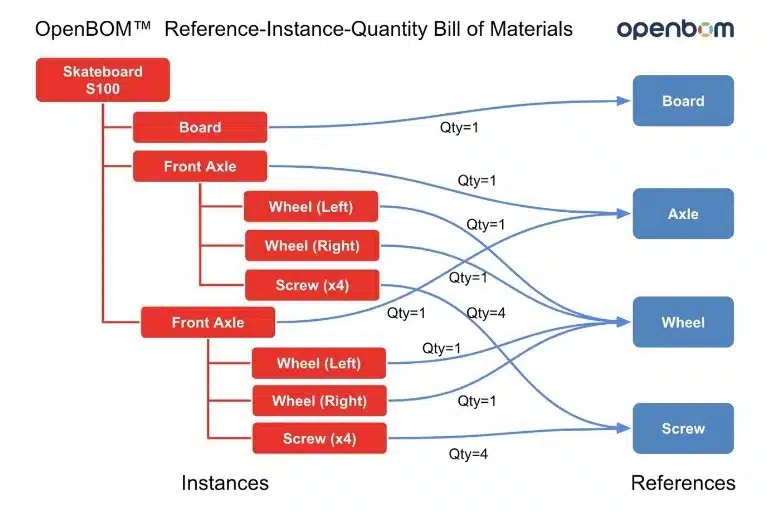
Assuming, you are aware of the Reference-Instance model, lett’s get deep into details of creating and managing the Bill of materials.
Comparison #1
Managing parts, instances, re-use components, single-level and multi-level BOM and restructure of information. In my first video, I’m demonstrating how can you do both in Excel and OpenBOM.
Advantages of OpenBOM is in managing structure, re-use component data and adding visual data.
Comparison #2
In the second comparison, I’m focusing on OpenBOM advantages in BOM management such as flatten report and rollup cost calculations. You will learn how to plan catalogs, calculate the quantity and any property rollup (in my case, it was cost rollup).
Conclusion
Think about OpenBOM as an online spreadsheet with a huge amount of BOM steroids. It is easy to start (free) and it gives you something spreadsheet cannot – a distributed database of items (catalogs), reference-instance model in BOMs, flatten BOM, rollups and more.
Start using OpenBOM today and leave your old spreadsheet behind. Register for FREE OpenBOM subscription here.
Best, Oleg @ openbom dot com.
Let’s get to know each other better. If you live in the Greater Boston area, I invite you for a coffee together (coffee is on me). If not nearby, let’s have a virtual coffee session — I will figure out how to send you a real coffee.
Want to learn more about PLM? Check out my Beyond PLM blog and PLM Book website
Join our newsletter to receive a weekly portion of news, articles, and tips about OpenBOM and our community.