


Many manufacturing companies using SOLIDWORKS as a mechanical design CAD system start with a relatively simple engineering process.
A few engineers work on assemblies and drawings. Files are stored in shared folders or local drives. Bills of materials are exported to Excel. Purchasing manually creates supplier lists and updates ERP records. Manufacturing receives PDFs and spreadsheets before production begins.
At first, this process works.
But as products become more complex, teams grow, suppliers become distributed, and the number of revisions increases, the process starts to break down. Engineers overwrite each other’s files. Purchasing orders the wrong revision. BOM spreadsheets drift away from CAD models. Manufacturing receives outdated information. ERP systems become disconnected from engineering reality.
Most teams don’t experience these problems as a single catastrophic failure. Instead, they experience them as constant operational friction.
The challenge is no longer just designing products in CAD.
The challenge becomes coordinating engineering, purchasing, manufacturing, and business systems around constantly changing product data.
This is where connected cloud-native platforms such as OpenBOM are changing how modern teams using SOLIDWORKS as a mechanical design CAD system operate.
Cloud PDM for SOLIDWORKS: Getting File Control Without the Overhead
For many engineering teams, product development still revolves around files.
Assemblies, parts, drawings, PDFs, STEP exports, DXFs, simulation outputs, and supplier documents all move between engineers, manufacturing teams, and vendors. Over time, shared folders become crowded with duplicate versions, renamed files, disconnected references, and uncertain ownership.
Every engineer has seen folders containing files such as:
- FINAL
- FINAL_v2
- FINAL_USE_THIS
- FINAL_REAL
The underlying problem is rarely the CAD software itself. The problem is coordination between people working on interconnected product data.
As teams scale, engineering leaders need confidence that files are not being overwritten, references remain intact, revisions are traceable, derivative files stay synchronized, and multiple engineers can collaborate safely.
Traditional desktop PDM systems attempted to solve this problem through rigid vaults and check-in/check-out workflows. While effective in some environments, these systems often introduce operational overhead and are difficult to extend across distributed teams and suppliers.
Modern cloud PDM approaches are evolving toward collaborative engineering workspaces rather than isolated vault systems.
With OpenBOM, teams using SOLIDWORKS as a mechanical design CAD system can manage assemblies, revisions, and file structures in a shared cloud environment while maintaining collaborative locking, revision history, and visibility into design changes. Engineers can understand who is working on what without constantly coordinating through meetings, emails, or spreadsheets.
The goal is not simply file storage.
The goal is reducing uncertainty inside the engineering process.
For teams looking to go further, OpenBOM is introducing CAD File Agent for SOLIDWORKS — a new capability built on top of this established cloud PDM foundation. Where cloud PDM handles the fundamentals of file control, revisions, and collaborative access, CAD File Agent adds a conversational, AI-powered layer on top. Instead of navigating menus and dashboards to find out what changed, who has a file locked, or whether an assembly is connected to a BOM, engineers can work naturally with product information through an agentic interface that understands SOLIDWORKS assemblies, parts, and drawings in context. It does not replace the structured workflows that cloud PDM provides.
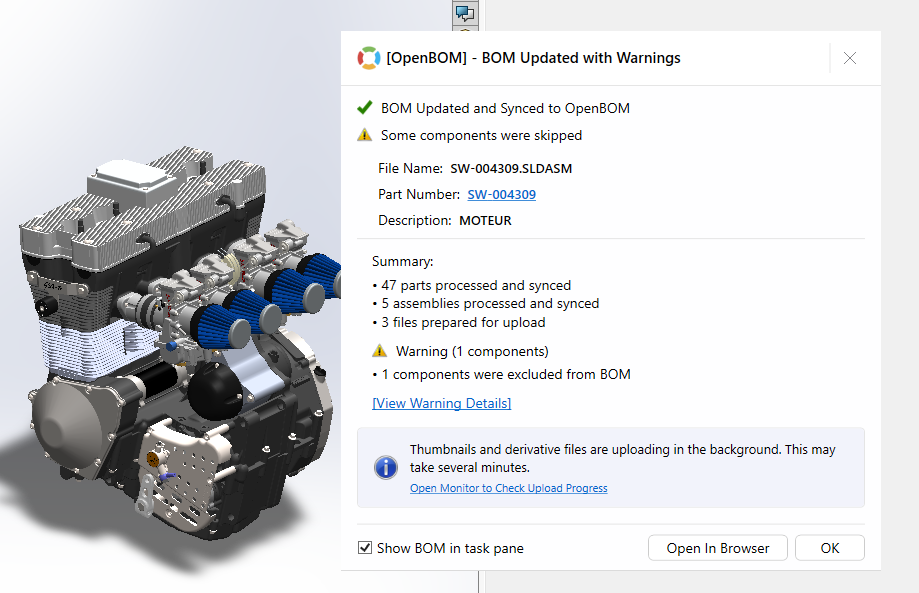
It makes those workflows easier to interact with — and begins connecting file-level knowledge to the broader product data that lives across BOMs, procurement, and downstream systems.

This is the first step toward what OpenBOM calls the Product Memory Platform: a connected layer where engineering knowledge becomes something teams can query, reuse, and build on rather than reconstruct from scratch every time.
SOLIDWORKS BOM Management: From Static Export to Live Product Data
Once engineering teams gain control over files and revisions, the next operational challenge appears almost immediately: the Bill of Materials.
In many companies, the BOM still exists as a disconnected spreadsheet exported from CAD and manually modified by different departments. Engineering updates quantities. Purchasing adds suppliers. Manufacturing adjusts descriptions. Finance adds cost information.

Over time, multiple versions of the BOM begin circulating simultaneously.
This creates a dangerous situation where engineering, procurement, and manufacturing are all working from slightly different product definitions.
The modern digital BOM changes this model completely.
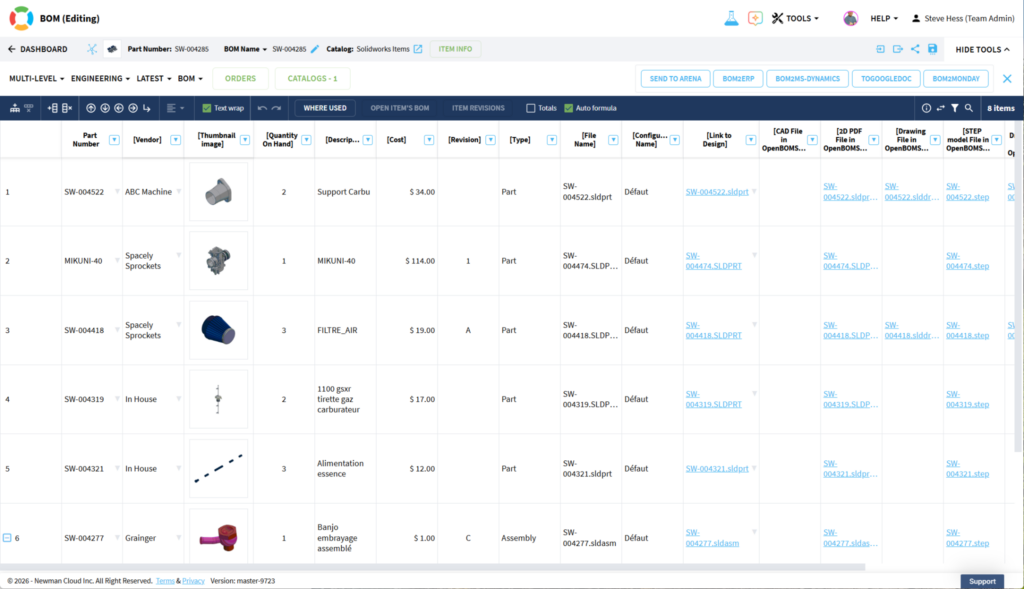
Instead of acting as a static report, the BOM becomes a connected operational dataset tied directly to engineering information.
When integrated with SOLIDWORKS, OpenBOM automatically generates structured product data containing quantities, part metadata, vendor information, cost data, lifecycle states, derivative files, assembly relationships, and revision information.
This changes how information flows across the business.
Purchasing no longer depends on manually updated spreadsheets. Manufacturing can access synchronized product structures. Suppliers can receive accurate derivative data. Engineering changes propagate through connected product records instead of disconnected exports.
The BOM becomes more than a list of parts.
It becomes the operational backbone connecting engineering to downstream business processes.
Engineering Change Management: How ECO Processes Reduce Operational Chaos
Every manufacturing company experiences engineering changes.
Components become unavailable. Costs increase. Suppliers change. Manufacturing constraints appear late in the process. Customers request modifications. Engineers discover improvements during prototyping.
The question is not whether changes will happen.
The real question is how organizations coordinate those changes across teams.
Without structure, engineering changes become operational chaos: purchasing orders obsolete components, production uses outdated revisions, suppliers receive conflicting files, approvals happen through email chains, and nobody fully understands impact.
This is why change management matters.
But effective change management is not simply about approval workflows. It is about helping engineering, manufacturing, procurement, and operations teams maintain shared understanding while the product evolves.
Structured ECO processes help teams track what changed, why it changed, who approved it, which assemblies are affected, what suppliers must be notified, and which revisions should be released.
Within OpenBOM, engineering changes can move through collaborative workflows that connect revisions, BOMs, files, and downstream operational data together.
The most important outcome is not bureaucracy.
It is organizational clarity.
A well-structured change process reduces confusion, reduces stress between teams, and improves confidence that everyone is building, purchasing, and shipping the correct product definition.
Procurement Planning with BOM Data: Closing the Gap Between Engineering and Purchasing
At some point in almost every growing manufacturing company, a purchasing manager ends up building a BOM from scratch.
Not because the BOM doesn’t exist. It does. Somewhere. Probably in three different versions — one in the engineer’s local folder, one the purchasing team modified to add vendor columns last quarter, and one that got emailed to a supplier two weeks ago with a different quantity on line 47.
So the buyer does what experienced buyers do: they call engineering. Engineering sends a fresh export. The buyer reformats it, adds supplier columns, pastes in pricing from a previous RFQ, and sends it out.
This process is not broken in a dramatic way. It works. But it costs time on every single part revision, and it quietly accumulates risk every time a change happens in engineering that nobody in purchasing heard about.
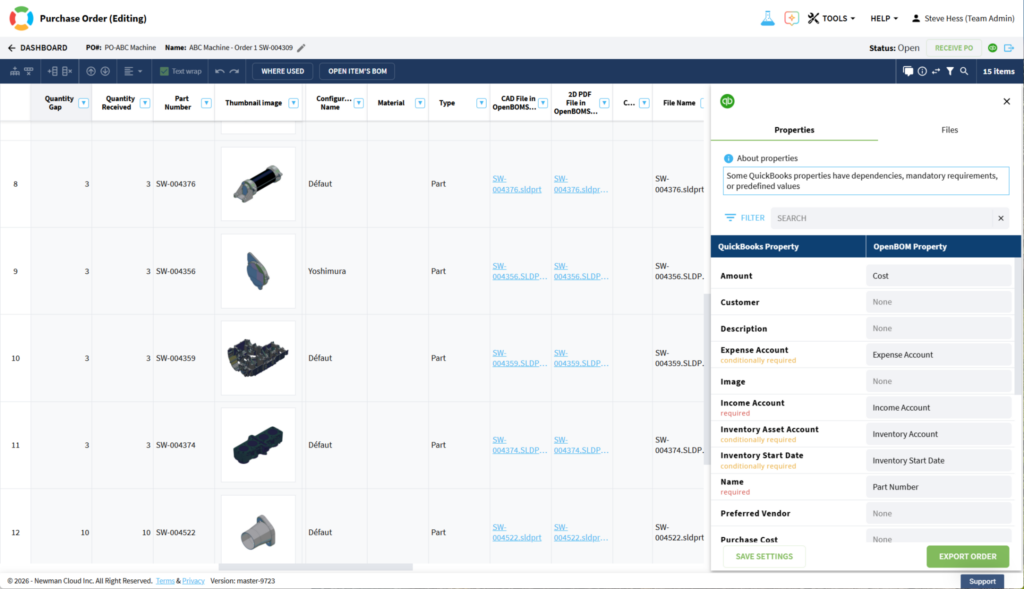
The real problem is that procurement and engineering are managing the same product from different datasets.
Because OpenBOM keeps BOM data connected to live engineering structures, procurement teams can work from the same product definition engineers are maintaining — including quantities, approved vendors, alternates, and revision states. Inventory can be tracked against the actual BOM rather than a snapshot from last month. RFQs can be assembled from current product data rather than reconstructed manually each time.
Shortages, vendor changes, and cost pressures still happen. But when engineering and purchasing are operating from connected information, the response is faster and the decision-making is more grounded.
Procurement should not have to reverse-engineer what engineering already knows.
SOLIDWORKS to ERP Integration: Stopping the Manual Data Entry Cycle
When a new part gets created in engineering, something quiet and expensive begins.
An engineer adds it to the BOM. A few days later, purchasing notices it is not in the ERP system yet. Someone creates the part record manually, guessing at the description, the unit of measure, the commodity code. If they guess wrong, it surfaces as a discrepancy during a purchase order, or an inventory count, or a finance reconciliation.
Multiply that by every BOM release, every revision, every product line.
In most companies using SOLIDWORKS as a mechanical design CAD system, this synchronization work is invisible. It happens in the background, done by people who know where the gaps are, using spreadsheets and emails and institutional memory to bridge engineering and business systems. It is not dramatic. But it is a steady drain on operational capacity — and a persistent source of errors that show up at the worst possible moments.
The goal of ERP integration is not to add another technical connection between systems.
The goal is to stop requiring human beings to manually translate engineering decisions into business records.

When OpenBOM is connected to systems such as NetSuite, Odoo, or QuickBooks, part data, BOM structures, and revision information can flow downstream without being retyped. The ERP reflects what engineering has released. Finance works from accurate cost structures. Purchasing creates orders against real part records.
Engineering and operations start speaking the same language — because they are finally reading from the same source.
From CAD to Operations: What Connected Product Data Actually Changes
For many companies using SOLIDWORKS as a mechanical design CAD system, the bottleneck is no longer engineering itself.
The bottleneck is everything that happens after the model is done.
Who has the right files? Which BOM did purchasing use? Did the change get communicated before the order went out? Why doesn’t the ERP match what engineering released?
These questions cost real time, real money, and real organizational trust. And they compound as products become more complex, teams grow, and supply chains become less predictable.
The answer is not more process. It is better connection between the processes that already exist.
That is what modern cloud-native product platforms like OpenBOM are built to do — not replace the judgment of engineers, buyers, or operations teams, but give them a shared foundation of product information they can actually trust.
Files are where products begin. Connected operations are how they reach the world.
Interested to check more how OpenBOM can help?
REGISTER FOR FREE today to explore OpenBOM and SolidWorks together.
Best, Oleg
Join our newsletter to receive a weekly portion of news, articles, and tips about OpenBOM and our community.


