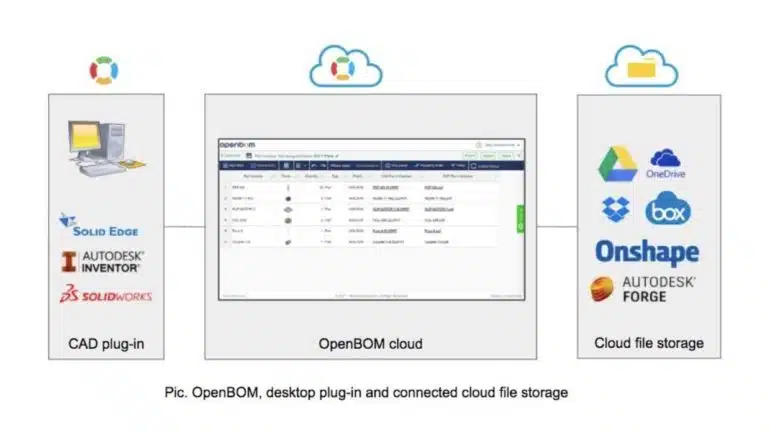
You have asked me about files and how to store them connected to BOM items. Well, here you go! OpenBOM is not your typical PDM system. When we considered how to manage files using OpenBOM OpenBOM gives you some very unique and interesting options on how to connect and manage files using OpenBOM.
OpenBOM gives you a possibility to connect BOM and catalog records to cloud storages. OpenBOM supports some of these cloud storages out of the box (eg. Dropbox, Microsoft OneDrive, Google Drive and others). However, we can also integrate your custom or corporate cloud storage to OpenBOM).
The connection of OpenBOM with cloud storage is done using OpenBOM “reference” type property. This property is allowing you to add URL link and keep a clickable display value. Edit reference property user interface allows you to integrate with cloud storages by uploading files directly to storage like Dropbox or Google Drive.
The following video shows you how it can be done:
However, we realized that OpenBOM customers are often using desktop CAD as a source of information to create a BOM. How to get those files to the cloud you might be asking yourself?
OpenBOM gives you that option. Imagine you’re using Solidworks integration, but you would like to store and share the data in the cloud storage such as Dropbox. OpenBOM integrations can do it. Here is how we do it.
OpenBOM is able to “cloud-enable” any company using existing CAD desktop systems with it’s the ability to extend collaboration and communication to contractors and suppliers. Moreover, we not only provide BOM sharing and real-time collaboration with distributed teams, we also help make available 3D CAD files and auto-generate neutral geometry files.
Below is a diagram that gives you step-by-step instructions on how to configure an OpenBOM plug-in.
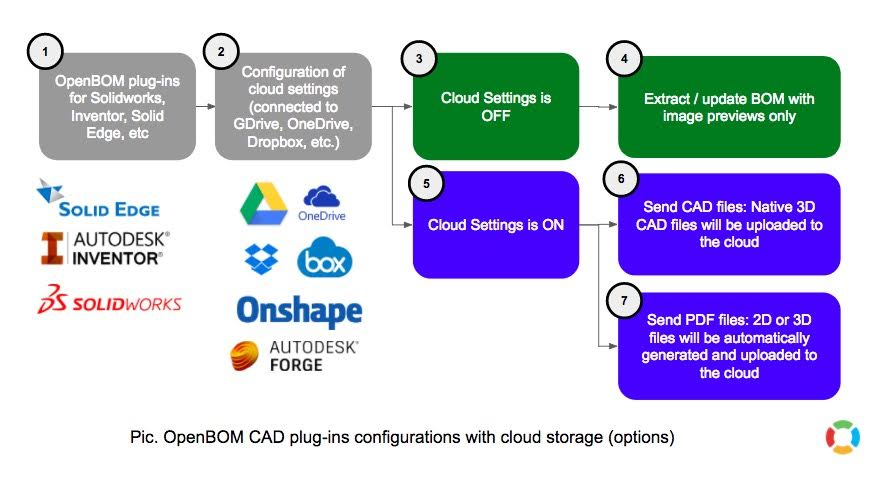
- OpenBOM plug-in install. You can download it from OpenBOM integration page. When in CAD systems find “Configuration” or Setting in a specific plug-in.
- Select [x] to enable cloud settings in the plug-in and authenticate cloud storage. We recommend configuring one cloud storage account per team, which makes things easier.
- Cloud settings are OFF meant plug-in works as before. No content will be taken to the cloud.
- BOM is created using metadata only. Thumbnail image preview is included.
- Cloud setting is ON. In such configuration, OpenBOM plug-in will upload files to the cloud storage.
- Native CAD files will be uploaded.
- Neutral geometry files will be automatically generated and uploaded.
Check the following video. It gives you a step by step demo how to send Soldiworks data to connected Dropbox account and show links in OpenBOM.
Conclusion
OpenBOM gives you an easy and robust way to integrate cloud storage into OpenBOM by linking data. It is easy and you don’t need to worry about multiple storages data is located. If your company is already using Google Drive or Dropbox, we will connect and upload data there. However, if you’re using custom or special corporate storage, we will connect OpenBOM to the same storage.
Have questions? Let me know and check OpenBOM today. Out of the box, cloud storage integration is available in OpenBOM user (FREE) subscription.
Best, Oleg
P.S. Let’s get to know each other better. If you live in the Greater Boston area, I invite you for a coffee together (coffee is on me). If not nearby, let’s have a virtual coffee session — I will figure out how to send you a real coffee.
Want to learn more about PLM? Check out my Beyond PLM blog and PLM Book website.
Join our newsletter to receive a weekly portion of news, articles, and tips about OpenBOM and our community.