One of the questions often comes from new OpenBOM users about Catalogs – how many Catalogs should I create? This is a great and important question. So, I wanted to spend some time to give a recommendation about how to organize data in OpenBOM catalogs.
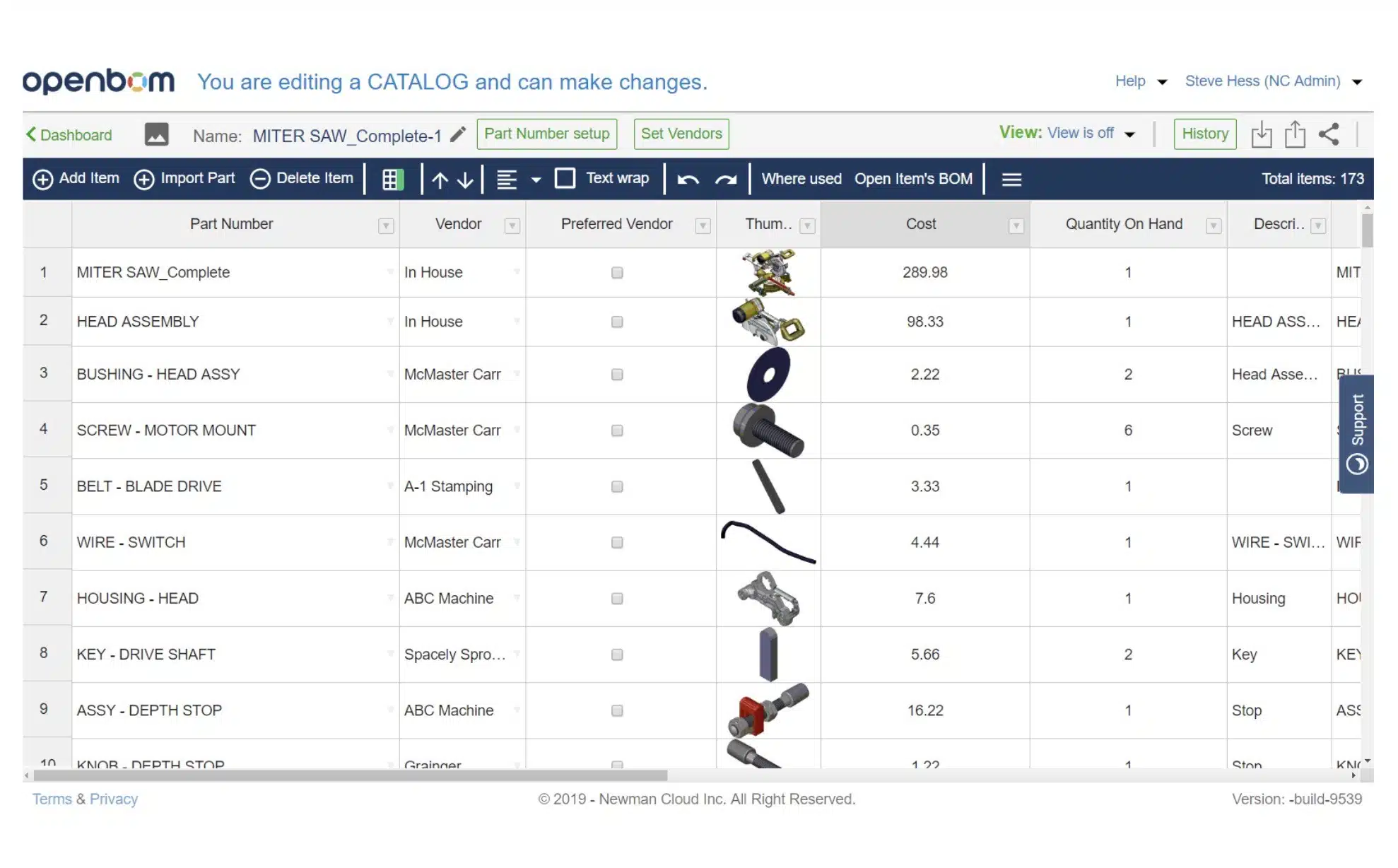
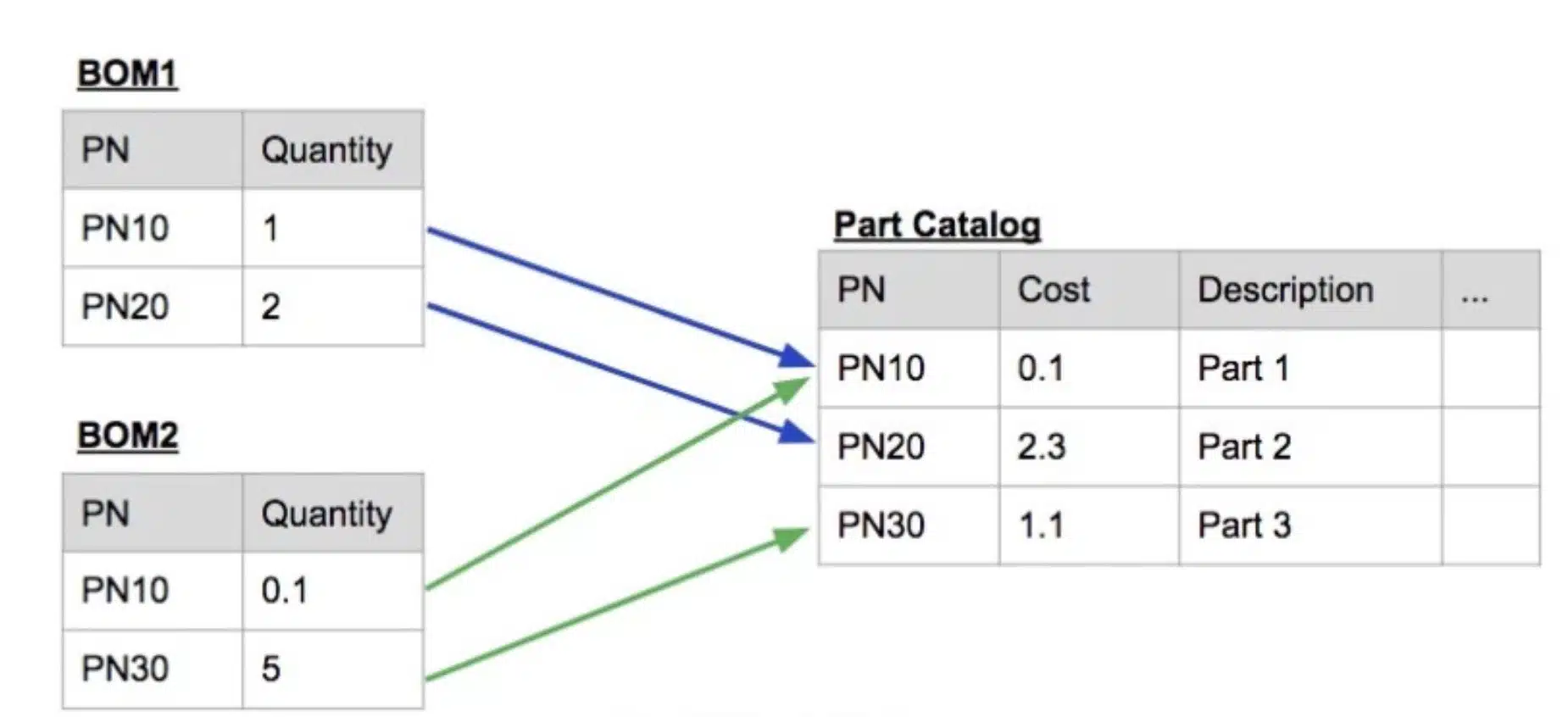
In a nutshell, OpenBOM manages data organized as catalog(s) and Bill of Materials. Think about a catalog(s) as a centralized database of all your items (standard, engineering, outsourced, etc.). Bill of Materials is the way to organize items in products. There is a lot of flexibility how you can get on top of this abstraction.
Before to start, I recommend you to check a few articles I already wrote about OpenBOM catalogs.
OpenBOM – Best Practices about BOM and Catalogs
How to plan data properties in BOMs and Catalogs
Demystifying OpenBOM BOMs and Catalogs Part 3, Part 2, Part 1
A Catalog is a central location for storing information about any item which may be used in a Bill of Material. Essentially anything in your company which has a part number can be an entry in a catalog. You can think about a catalog(s) as a database of all items management in the company – standard, engineered, outsourced. Each Item should be registered in a catalog and has its Part Number and additional information – Price, Mass, Manufacturer Name, etc.
So, how many catalogs you need? First, there is no right or wrong answer on that question. OpenBOM functions are NOT AFFECTED if you use one catalog or twenty-five catalogs. OpenBOM will be the same, but you need to remember about some specifics when you use one or multiple catalogs.
My recommendation is to start simple. You can always make it more complex if needed. So, start from one catalog. When you learn about why to use another one, you can add more.
1- Single catalog
The simplest idea – one catalog to keep everything. You cannot go wrong with one catalog. All parts will be management there. A huge advantage that even in free OpenBOM subscription you will be able to control the uniqueness of part numbers in a single catalog. Combined with simplicity, these are clear pros. What are cons? The biggest one is that you will need to add ALL properties to this catalog. Not all parts need all properties, but you will have them anyway. Another con is that you will have a single Part Number pattern or will have to manage Part Numbers manually.
2- Classification of item data (the most useful approach)
Once you understand how OpenBOM catalog mechanism works, you can get beyond a single catalog and add the catalog to classify data. You can think about special catalog for standard parts vs custom parts. Another way to think is mechanical, electrical, etc. Classification ideas are good. This is my “recommended” approach. There is only one con in such an approach. OpenBOM cannot control uniqueness of Part Numbers across multiple catalogs in the entry subscription levels. It requirements Company Subscription (coming later this year).
3- Catalog for contractors and suppliers
Occasionally, you can find yourself with the need to create a special catalog for a specific contractor or supplier. It is fine and you should do so. The clear pro is to give granular access to that contractor or supplier. The obvious con is to manage an additional level of complexity.
A great advantage and unique function of OpenBOM is to be able to manage distributed catalogs and virtually connect them together in your account. So, all catalogs in your OpenBOM account are connected and can be used together in all BOMs. In coming months, we are going to introduce OpenBOM company subscription where we are will support more advanced features to manage catalogs. Stay tuned.
Conclusion.
My general recommendation is to start simple and grow as you need. Start from a simple single catalog and move towards a more granular definition of data. Remember, even a single catalog is already a great way to start organizing your data and make it much more manageable compared to Excel files.
Check our blog and YouTube for videos and examples.
Best, Oleg
Let’s get to know each other better. If you live in the Greater Boston area, I invite you for a coffee together (coffee is on me). If not nearby, let’s have a virtual coffee session — I will figure out how to send you a real coffee.
Want to learn more about PLM? Check out my Beyond PLM blog and PLM Book website
Join our newsletter to receive a weekly portion of news, articles, and tips about OpenBOM and our community.